AJAX REX Jeweller Wireless repeater - HUB - 1 pcs, HUB 2 - 5 pcs, HUB Plus - 5 pcs, HUB 2 Plus - 5 pcs, Black
(0)
€149,97
Unit price
This product will be available for purchase in 2 weeks, but you can pre-order it now to receive a 10% discount!
ReX Jeweller
Description ReX Jeweller is a communication signal amplifier that increases the range of Ajax devices' radio communication with the hub up to 2 times. The device is intended for indoor use only. It features built-in tamper protection and a battery that provides up to 35 hours of operation without external power supply.
Compatibility
Works only with Ajax hubs.
Connection to uartBridge and ocBridge Plus is not foreseen.
Control and notifications
Configurable via mobile app (iOS, Android).
Notifications: push, SMS and calls (if activated).
All events are logged and notified to the user.
Monitoring
The Ajax system can be used for independent monitoring of the site.
Connection to the Security Company Central Station (CMS) is possible.
Functional element
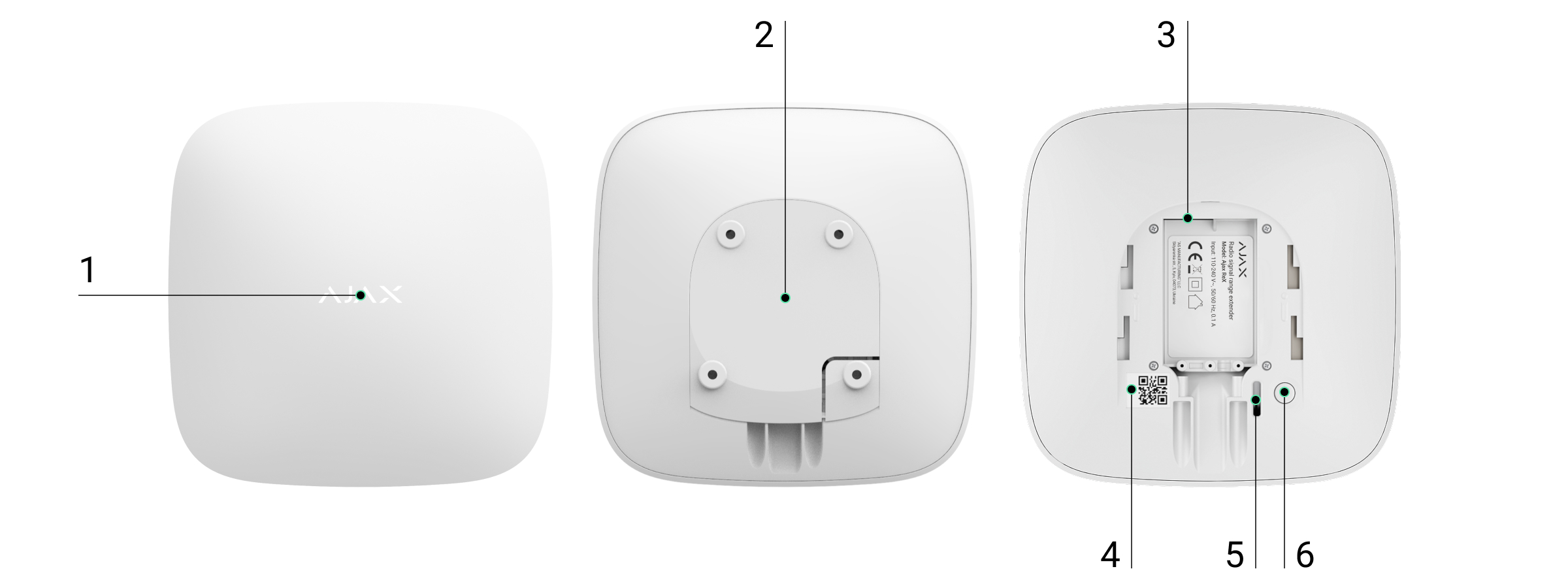
Functional elements
Logo with light indicator
SmartBracket mounting panel (perforated part required to activate the tamper when attempting to remove the ReX Jeweller from the surface)
Power connector
QR code
Tamper button
Power button
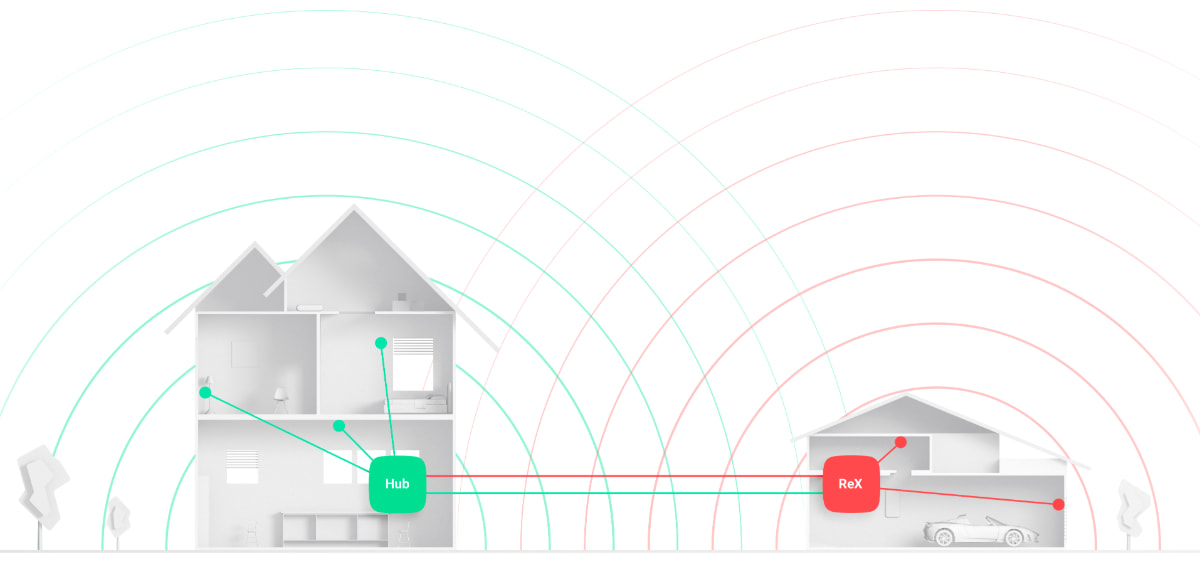
Operating principle The ReX Jeweller extends the radio communication range of the security system, allowing Ajax devices to be installed at a greater distance from the hub.
Communication range The communication range between ReX Jeweller and the device is limited by the range of the device's own radio signal (specified in the device specification on the website and in the user manual).
Operation The ReX receives signals from the hub and forwards them to the connected devices, as well as returning signals from the devices back to the hub. The Hub checks the amplifier every 12-300 seconds (default every 36 seconds), while alarms are transmitted within 0.3 seconds.
Number of connected ReX Jeweller
Depending on the Hub model, the following number of signal boosters can be added:
Hub - 1 ReX Jeweller
Hub Plus - up to 5 ReX Jeweller
Hub 2 (2G) - up to 5 ReX Jeweller
Hub 2 (4G) - up to 5 ReX Jeweller
Hub 2 Plus - up to 5 ReX Jeweller
Superior Hub Hybrid - up to 5 ReX Jeweller
Multiple ReX Jeweller connections are supported on devices running Malevich OS 2.8 and later. ReX Jeweller can only be connected directly to the hub - cross-amplifier connections are not supported. ⚠️ ReX Jeweller does not increase the total number of devices that can be connected to the hub!
Connecting ReX Jeweller to a Hub
Hub and devices operating on different radio frequencies are not compatible.
Radio frequency range may vary by region. It is recommended to purchase and use Ajax devices in the same region.
Working radio frequencies can be checked with technical support.
Before connecting the device
Install the Ajax app or Ajax PRO.
Sign in to an existing account or create a new one.
Select an existing Space or create a new one.
Space functionality is available from the following versions or later:
Ajax Security System 3.0 iOS
Ajax Security System 3.0 for Android
Ajax PRO: Tool for Engineers 2.0 iOS
Ajax PRO: Tool for Engineers 2.0 Android
Ajax PRO Desktop 4.0 macOS
Ajax PRO Desktop 4.0 Windows
Add at least one virtual room(Room).
Connect a compatible hub to this Space. Make sure the hub is switched on and has internet access (Ethernet, Wi-Fi and/or mobile network).
Make sure the system is disarmed and the hub is not performing an update (statuses visible in the Ajax app).
⚠️ Only a user with administrator rights can add a device to the hub.
Connecting
Open the Ajax app and select Add Device.
Name the amplifier, scan or manually enter the QR code (located on the cover and packaging).
Select the room where the device will be installed.
Connection process
In the app, press Add - a countdown timer will start.
Switch on ReX Jeweller by holding the power button down for 3 seconds.
Once connected to the hub, the device logo will change colour from red to white (within 30 seconds of switching on).
Detection and connection For connection and detection to take place, the ReX Jeweller must be within radio communication range of the hub (in the same guarded area).
The connection request with the hub is only sent when the device is switched on. If the connection with the hub fails:
Switch off the amplifier by pressing the power button for 3 seconds,
Repeat the connection procedure after 5 seconds.
Once connected to the hub, the amplifier will appear in the app in the device list. The update interval of the device status in the list depends on the polling time set in the hub settings (default value 36 seconds).
Assigning devices to work via ReX Jeweller To add a device to the booster:
Open the ReX Jeweller settings (Devices → ReX Jeweller → Settings).
Press Pair with device.
Select the devices that will work through the amplifier.
Return to the ReX Jeweller settings menu.
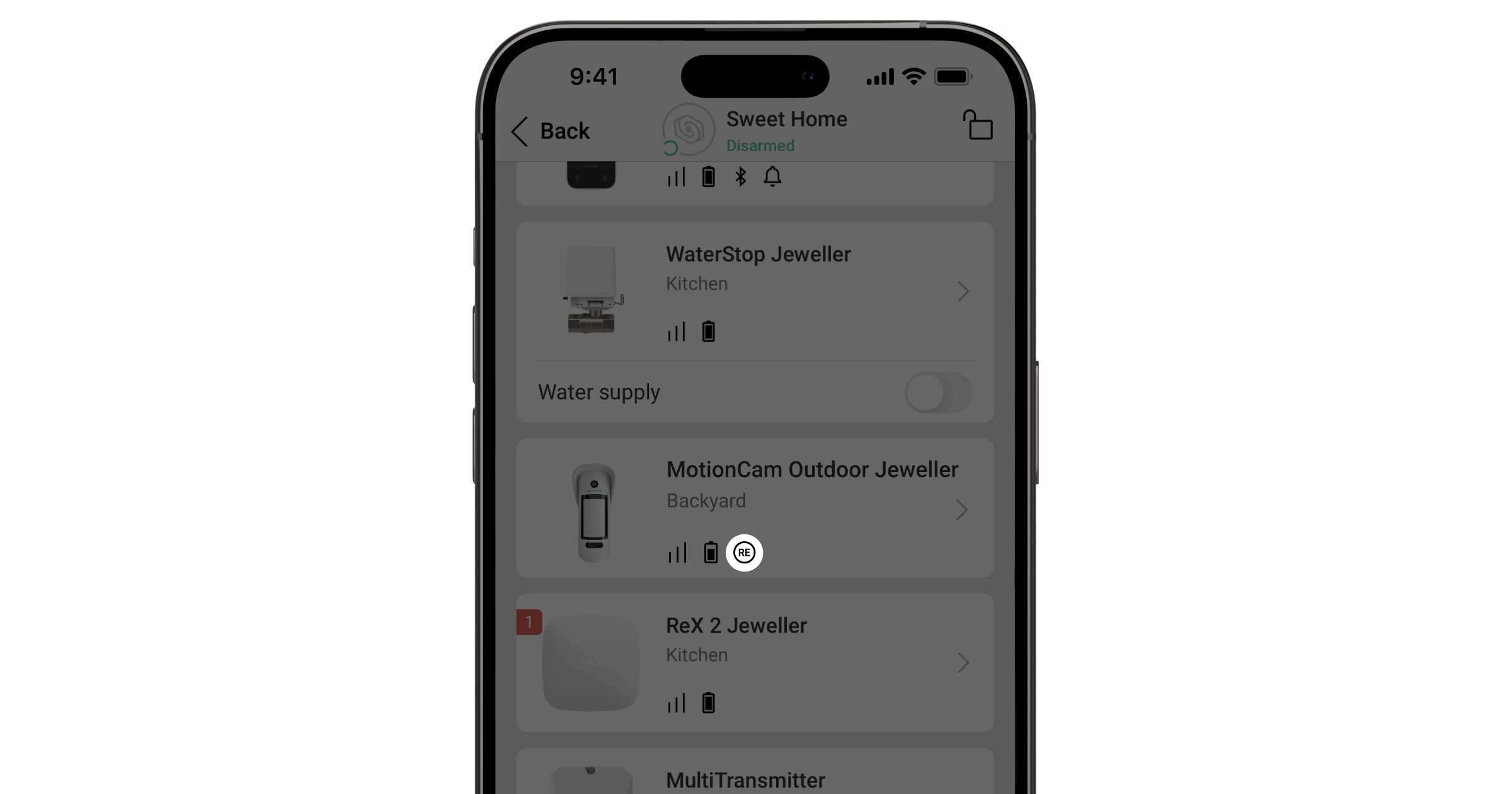
Once connected, the selected devices will be marked with the 🔗 icon in the mobile app.
ReX Jeweller restrictions and connecting
ReX Jeweller does not support connecting to MotionCam motion detectors with visual alarm verification as it uses the optional Wings radio protocol.
Only one ReX Jeweller can be connected to a device. If a device is assigned to one amplifier, it is automatically disconnected from another.
Assigning a device directly to a hub
Go to the ReX Jeweller settings (Devices → ReX Jeweller → Settings).
Press Pair with device.
Uncheck the devices that should be paired directly to the hub.
Return to the settings menu.
ReX Jeweller states
Devices → ReX Jeweller → States
Data import - error message during data transfer to a new hub.
Failed - the device has not been transferred to the new hub.
Some functions do not work - displayed if the versions of the hub and ReX Jeweller firmware do not match.
The update takes half an hour (if the system is disarmed).
Required:
A stable external power supply for the hub and amplifier,
Stable quality of the Hub-ReX Jeweller connection,
huba internet connection.
Jeweller Signal Strength - signal strength between the hub and the ReX Jeweller.
Connection - Connection status between hub and amplifier.
Transmitter power - status of the transmitter power (only visible in the signal attenuation test).
Battery Charge - battery charge level in percent.
Lid - tamper status, reacts to an attempt to remove or damage the housing.
External power - status of the external power supply.
Radio transmitter power - displayed in the signal attenuation test (Maximum / Minimum).
Permanent Deactivation - status of the device:
Active - Active;
Entirely - completely disabled;
Lid only - only tamper messages are ignored.
Firmware - ReX Jeweller firmware version.
Device ID - device identifier.
ReX Jeweller settings
Devices → ReX Jeweller → Settings
Name - device name (editable).
Room - virtual room selection.
Charging mode(only available for Ajax PRO with OS Malevich 2.24+) - battery charging mode:
Continuous - continuous to full charge (suitable for most power supplies).
Interval - intermittent charging (recommended for zinc-air power supplies).
LED Brightness - brightness adjustment of the logo illumination.
Pair with device - assigning devices to work through ReX Jeweller.
Jeweller Signal Strength Test - signal strength test between hub and amplifier.
Signal Attenuation Test - decrease/increase transmitter power to simulate interference and check connection stability.
Permanent Deactivation - Disabling a device without removing it from the system.
No - normal operation.
Entirely - no system commands are executed and messages are ignored.
Lid only - only tamper notifications are ignored.
User Guide - ReX Jeweller User Guide.
Unpair device - disconnecting from the hub and deleting settings.
Trouble messages
When failures occur, they are displayed in the Malfunctions field under Device States.
Some functions do not work - Incompatible hub and ReX Jeweller firmware.
Solution: make sure that huba automatic updates are switched on.
LED indication
The ReX Jeweller LED indicator may glow red or white depending on the device state.
Event
LED indicator status
Device is connected to the hub
On solid white
Device lost connection to hub
Lights steady red
No external power supply
Flashes every 10 seconds
Functionality check
A test for ReX Jeweller connected devices will be added in future OS Malevich updates.
The Ajax system allows tests to be run to verify the functionality of connected devices. Tests are not initiated immediately, but within up to 36 seconds if standard settings are used. The start time depends on the polling interval settings of the detector(Jeweller section in the hub settings).
Can be checked:
Jeweller signal strength between ReX Jeweller and the hub;
Jeweller signal strength between ReX Jeweller and the connected device.
Starting the test:
To test the signal strength between the amplifier and the hub - open the ReX Jeweller settings and select Jeweller Signal Strength Test.
To test the signal strength between the amplifier and the connected device - open the settings of the connected device and select Jeweller Signal Strength Test.
Device Setup
Site selection
The location of the ReX Jeweller determines the distance to the hub, the connected devices and the effect of obstacles (walls, covers, large objects) on the propagation of the radio signal.
The device is intended for indoor use only.
Be sure to check the signal strength at the selected location!
If the indicator shows only one level, stable operation is not guaranteed. To improve the signal, move the ReX Jeweller or hub - even a 20 cm movement can significantly improve reception.
Installation procedure
Choose a location that meets the requirements of the manual, preferably hidden from direct view.
Observe electrical safety rules and regulations during installation.
Secure the SmartBracket mounting panel with the screws provided.
If you use other fasteners, make sure that the panel is not damaged or deformed.
It is not recommended to use double-sided tape as this may cause the device to fall off and be damaged.
Slide the ReX Jeweller onto the mounting panel.
After installation, check the tamper status in the Ajax app and the rigidity of the panel.
For extra security, secure the ReX Jeweller to the SmartBracket panel with the supplied screws.
Installation security
Do not install the amplifier in an inverted manner in a vertical mounting (e.g. on a wall). In the correctly fixed position, the Ajax logo is readable horizontally.
If an attempt is made to remove the unit from the surface or disconnect it from the mounting panel, the user will receive a message.
The device must not be disassembled while it is connected to power.
It is forbidden to use the appliance with a damaged power cable.
Do not disassemble or modify the ReX Jeweller or its components - this may cause malfunction or complete destruction of the device.
It is forbidden to install the ReX Jeweller
Outdoors.
Near metal objects or mirrors that attenuate or block radio signals.
In rooms with humidity or temperature levels exceeding the permitted limits.
Closer than 1 metre to the router or power cables (sources of radio interference).
Maintenance
Check the Ajax system regularly.
Clean the housing of dust, spider webs and other dirt using a soft dry cloth designed for the care of machinery.
Do not use substances containing alcohol, acetone, petrol or other active solvents.
Battery replacement: Instructions for replacing the ReX Jeweller radio amplifier battery are available separately.
Technical parameters
All technical parameters are available in the ReX Jeweller specification.
Compliance with standards
The device complies with the specified international and regional standards.
Warranty
The manufacturer' s warranty is valid for 2 years from the date of purchase.
The warranty does not cover the pre-installed battery.
If the device does not work properly, please contact support first - in half of the cases technical problems are solved remotely.
Technical Specifications - ReX Jeweller
Model: ReX Jeweller Purpose: Radio amplifier for Ajax devices (indoor only)
Connections and communication
Compatibility: only with Ajax Hub series (not compatible with uartBridge and ocBridge Plus)
Signal transmission technology: Jeweller (commands, alarms, events)
Data protection: two-way communication, block encryption with variable key, tamper protection
Radio range: up to 2000 m (line-of-sight)
Browsing interval: 12-300 s (default 36 s)
Alarm notification: up to 0.3 s
Supported radio frequency ranges (depending on region):
866.0-866.5 MHz
868.0-868.6 MHz
868.7-869.2 MHz
Maximum effective radiated power (ERP): up to 20 mW
Automatic power regulation to reduce interference and power consumption
Power supply and battery
Power supply: from external source (DC)
Built-in battery: up to 35 h operation without external power supply
Tamper protection: tamper button (response to removal attempts)
Functions and controls
Built-in LED indicator (for status display)
Control and configuration: Ajax mobile and desktop apps (iOS, Android, Windows, macOS)
*Offer valid only for purchases made in the online store
In-Store Pickup: Make your payment and, once confirmed, pick up your order at 15a Cesvaines Street, Riga
Delivery
We offer convenient delivery throughout Latvia to Omniva, DPD, or Latvijas Pasts pickup points for €2.99, or delivery by courier to your address for €7.99.
Free delivery to pickup points for orders of €100 or more; free courier delivery for orders of €300 or more.
Warranty
All products in our store come with an official warranty ranging from 2 to 6 years, depending on the manufacturer.
The warranty period is the same for both individuals and businesses!
Share:
AJAX REX Jeweller Wireless...
AJAX REX Jeweller Wireless repeater -...
€149,97
Unit price
€149,97
Unit price
€149,97
Unit price
Free Shipping
To pickup points starting at €100; by courier starting at €300
30-Day Return Policy
All items must be free of signs of use
Product Description
ReX Jeweller
Description ReX Jeweller is a communication signal amplifier that increases the range of Ajax devices' radio communication with the hub up to 2 times. The device is intended for indoor use only. It features built-in tamper protection and a battery that provides up to 35 hours of operation without external power supply.
Compatibility
Works only with Ajax hubs.
Connection to uartBridge and ocBridge Plus is not foreseen.
Control and notifications
Configurable via mobile app (iOS, Android).
Notifications: push, SMS and calls (if activated).
All events are logged and notified to the user.
Monitoring
The Ajax system can be used for independent monitoring of the site.
Connection to the Security Company Central Station (CMS) is possible.
Functional element
Functional elements
Logo with light indicator
SmartBracket mounting panel (perforated part required to activate the tamper when attempting to remove the ReX Jeweller from the surface)
Power connector
QR code
Tamper button
Power button
Operating principle The ReX Jeweller extends the radio communication range of the security system, allowing Ajax devices to be installed at a greater distance from the hub.
Communication range The communication range between ReX Jeweller and the device is limited by the range of the device's own radio signal (specified in the device specification on the website and in the user manual).
Operation The ReX receives signals from the hub and forwards them to the connected devices, as well as returning signals from the devices back to the hub. The Hub checks the amplifier every 12-300 seconds (default every 36 seconds), while alarms are transmitted within 0.3 seconds.
Number of connected ReX Jeweller
Depending on the Hub model, the following number of signal boosters can be added:
Hub - 1 ReX Jeweller
Hub Plus - up to 5 ReX Jeweller
Hub 2 (2G) - up to 5 ReX Jeweller
Hub 2 (4G) - up to 5 ReX Jeweller
Hub 2 Plus - up to 5 ReX Jeweller
Superior Hub Hybrid - up to 5 ReX Jeweller
Multiple ReX Jeweller connections are supported on devices running Malevich OS 2.8 and later. ReX Jeweller can only be connected directly to the hub - cross-amplifier connections are not supported. ⚠️ ReX Jeweller does not increase the total number of devices that can be connected to the hub!
Connecting ReX Jeweller to a Hub
Hub and devices operating on different radio frequencies are not compatible.
Radio frequency range may vary by region. It is recommended to purchase and use Ajax devices in the same region.
Working radio frequencies can be checked with technical support.
Before connecting the device
Install the Ajax app or Ajax PRO.
Sign in to an existing account or create a new one.
Select an existing Space or create a new one.
Space functionality is available from the following versions or later:
Ajax Security System 3.0 iOS
Ajax Security System 3.0 for Android
Ajax PRO: Tool for Engineers 2.0 iOS
Ajax PRO: Tool for Engineers 2.0 Android
Ajax PRO Desktop 4.0 macOS
Ajax PRO Desktop 4.0 Windows
Add at least one virtual room(Room).
Connect a compatible hub to this Space. Make sure the hub is switched on and has internet access (Ethernet, Wi-Fi and/or mobile network).
Make sure the system is disarmed and the hub is not performing an update (statuses visible in the Ajax app).
⚠️ Only a user with administrator rights can add a device to the hub.
Connecting
Open the Ajax app and select Add Device.
Name the amplifier, scan or manually enter the QR code (located on the cover and packaging).
Select the room where the device will be installed.
Connection process
In the app, press Add - a countdown timer will start.
Switch on ReX Jeweller by holding the power button down for 3 seconds.
Once connected to the hub, the device logo will change colour from red to white (within 30 seconds of switching on).
Detection and connection For connection and detection to take place, the ReX Jeweller must be within radio communication range of the hub (in the same guarded area).
The connection request with the hub is only sent when the device is switched on. If the connection with the hub fails:
Switch off the amplifier by pressing the power button for 3 seconds,
Repeat the connection procedure after 5 seconds.
Once connected to the hub, the amplifier will appear in the app in the device list. The update interval of the device status in the list depends on the polling time set in the hub settings (default value 36 seconds).
Assigning devices to work via ReX Jeweller To add a device to the booster:
Open the ReX Jeweller settings (Devices → ReX Jeweller → Settings).
Press Pair with device.
Select the devices that will work through the amplifier.
Return to the ReX Jeweller settings menu.
Once connected, the selected devices will be marked with the 🔗 icon in the mobile app.
ReX Jeweller restrictions and connecting
ReX Jeweller does not support connecting to MotionCam motion detectors with visual alarm verification as it uses the optional Wings radio protocol.
Only one ReX Jeweller can be connected to a device. If a device is assigned to one amplifier, it is automatically disconnected from another.
Assigning a device directly to a hub
Go to the ReX Jeweller settings (Devices → ReX Jeweller → Settings).
Press Pair with device.
Uncheck the devices that should be paired directly to the hub.
Return to the settings menu.
ReX Jeweller states
Devices → ReX Jeweller → States
Data import - error message during data transfer to a new hub.
Failed - the device has not been transferred to the new hub.
Some functions do not work - displayed if the versions of the hub and ReX Jeweller firmware do not match.
The update takes half an hour (if the system is disarmed).
Required:
A stable external power supply for the hub and amplifier,
Stable quality of the Hub-ReX Jeweller connection,
huba internet connection.
Jeweller Signal Strength - signal strength between the hub and the ReX Jeweller.
Connection - Connection status between hub and amplifier.
Transmitter power - status of the transmitter power (only visible in the signal attenuation test).
Battery Charge - battery charge level in percent.
Lid - tamper status, reacts to an attempt to remove or damage the housing.
External power - status of the external power supply.
Radio transmitter power - displayed in the signal attenuation test (Maximum / Minimum).
Permanent Deactivation - status of the device:
Active - Active;
Entirely - completely disabled;
Lid only - only tamper messages are ignored.
Firmware - ReX Jeweller firmware version.
Device ID - device identifier.
ReX Jeweller settings
Devices → ReX Jeweller → Settings
Name - device name (editable).
Room - virtual room selection.
Charging mode(only available for Ajax PRO with OS Malevich 2.24+) - battery charging mode:
Continuous - continuous to full charge (suitable for most power supplies).
Interval - intermittent charging (recommended for zinc-air power supplies).
LED Brightness - brightness adjustment of the logo illumination.
Pair with device - assigning devices to work through ReX Jeweller.
Jeweller Signal Strength Test - signal strength test between hub and amplifier.
Signal Attenuation Test - decrease/increase transmitter power to simulate interference and check connection stability.
Permanent Deactivation - Disabling a device without removing it from the system.
No - normal operation.
Entirely - no system commands are executed and messages are ignored.
Lid only - only tamper notifications are ignored.
User Guide - ReX Jeweller User Guide.
Unpair device - disconnecting from the hub and deleting settings.
Trouble messages
When failures occur, they are displayed in the Malfunctions field under Device States.
Some functions do not work - Incompatible hub and ReX Jeweller firmware.
Solution: make sure that huba automatic updates are switched on.
LED indication
The ReX Jeweller LED indicator may glow red or white depending on the device state.
Event
LED indicator status
Device is connected to the hub
On solid white
Device lost connection to hub
Lights steady red
No external power supply
Flashes every 10 seconds
Functionality check
A test for ReX Jeweller connected devices will be added in future OS Malevich updates.
The Ajax system allows tests to be run to verify the functionality of connected devices. Tests are not initiated immediately, but within up to 36 seconds if standard settings are used. The start time depends on the polling interval settings of the detector(Jeweller section in the hub settings).
Can be checked:
Jeweller signal strength between ReX Jeweller and the hub;
Jeweller signal strength between ReX Jeweller and the connected device.
Starting the test:
To test the signal strength between the amplifier and the hub - open the ReX Jeweller settings and select Jeweller Signal Strength Test.
To test the signal strength between the amplifier and the connected device - open the settings of the connected device and select Jeweller Signal Strength Test.
Device Setup
Site selection
The location of the ReX Jeweller determines the distance to the hub, the connected devices and the effect of obstacles (walls, covers, large objects) on the propagation of the radio signal.
The device is intended for indoor use only.
Be sure to check the signal strength at the selected location!
If the indicator shows only one level, stable operation is not guaranteed. To improve the signal, move the ReX Jeweller or hub - even a 20 cm movement can significantly improve reception.
Installation procedure
Choose a location that meets the requirements of the manual, preferably hidden from direct view.
Observe electrical safety rules and regulations during installation.
Secure the SmartBracket mounting panel with the screws provided.
If you use other fasteners, make sure that the panel is not damaged or deformed.
It is not recommended to use double-sided tape as this may cause the device to fall off and be damaged.
Slide the ReX Jeweller onto the mounting panel.
After installation, check the tamper status in the Ajax app and the rigidity of the panel.
For extra security, secure the ReX Jeweller to the SmartBracket panel with the supplied screws.
Installation security
Do not install the amplifier in an inverted manner in a vertical mounting (e.g. on a wall). In the correctly fixed position, the Ajax logo is readable horizontally.
If an attempt is made to remove the unit from the surface or disconnect it from the mounting panel, the user will receive a message.
The device must not be disassembled while it is connected to power.
It is forbidden to use the appliance with a damaged power cable.
Do not disassemble or modify the ReX Jeweller or its components - this may cause malfunction or complete destruction of the device.
It is forbidden to install the ReX Jeweller
Outdoors.
Near metal objects or mirrors that attenuate or block radio signals.
In rooms with humidity or temperature levels exceeding the permitted limits.
Closer than 1 metre to the router or power cables (sources of radio interference).
Maintenance
Check the Ajax system regularly.
Clean the housing of dust, spider webs and other dirt using a soft dry cloth designed for the care of machinery.
Do not use substances containing alcohol, acetone, petrol or other active solvents.
Battery replacement: Instructions for replacing the ReX Jeweller radio amplifier battery are available separately.
Technical parameters
All technical parameters are available in the ReX Jeweller specification.
Compliance with standards
The device complies with the specified international and regional standards.
Warranty
The manufacturer' s warranty is valid for 2 years from the date of purchase.
The warranty does not cover the pre-installed battery.
If the device does not work properly, please contact support first - in half of the cases technical problems are solved remotely.
Technical Specifications - ReX Jeweller
Model: ReX Jeweller Purpose: Radio amplifier for Ajax devices (indoor only)
Connections and communication
Compatibility: only with Ajax Hub series (not compatible with uartBridge and ocBridge Plus)
Signal transmission technology: Jeweller (commands, alarms, events)
Data protection: two-way communication, block encryption with variable key, tamper protection
Radio range: up to 2000 m (line-of-sight)
Browsing interval: 12-300 s (default 36 s)
Alarm notification: up to 0.3 s
Supported radio frequency ranges (depending on region):
866.0-866.5 MHz
868.0-868.6 MHz
868.7-869.2 MHz
Maximum effective radiated power (ERP): up to 20 mW
Automatic power regulation to reduce interference and power consumption
Power supply and battery
Power supply: from external source (DC)
Built-in battery: up to 35 h operation without external power supply
Tamper protection: tamper button (response to removal attempts)
Functions and controls
Built-in LED indicator (for status display)
Control and configuration: Ajax mobile and desktop apps (iOS, Android, Windows, macOS)