ReX 2 Jeweller is a radio amplifier with support for alarm photo verification. It communicates with the hub via radio and Ethernet and is intended for indoor installation only.
It is equipped with tamper protection and a built-in backup battery that provides up to 38 h of operation without external power supply.
The amplifier works only with compatible Ajax hubs. Connection to other hubs, other amplifiers, uartBridge and ocBridge Plus is not guaranteed.
Connection and configuration is done via iOS, Android, macOS and Windows apps. Users receive push notifications, SMS and calls (if activated) for ReX 2 Jeweller events.
👉 Buy ReX 2 Jeweller radio signal booster
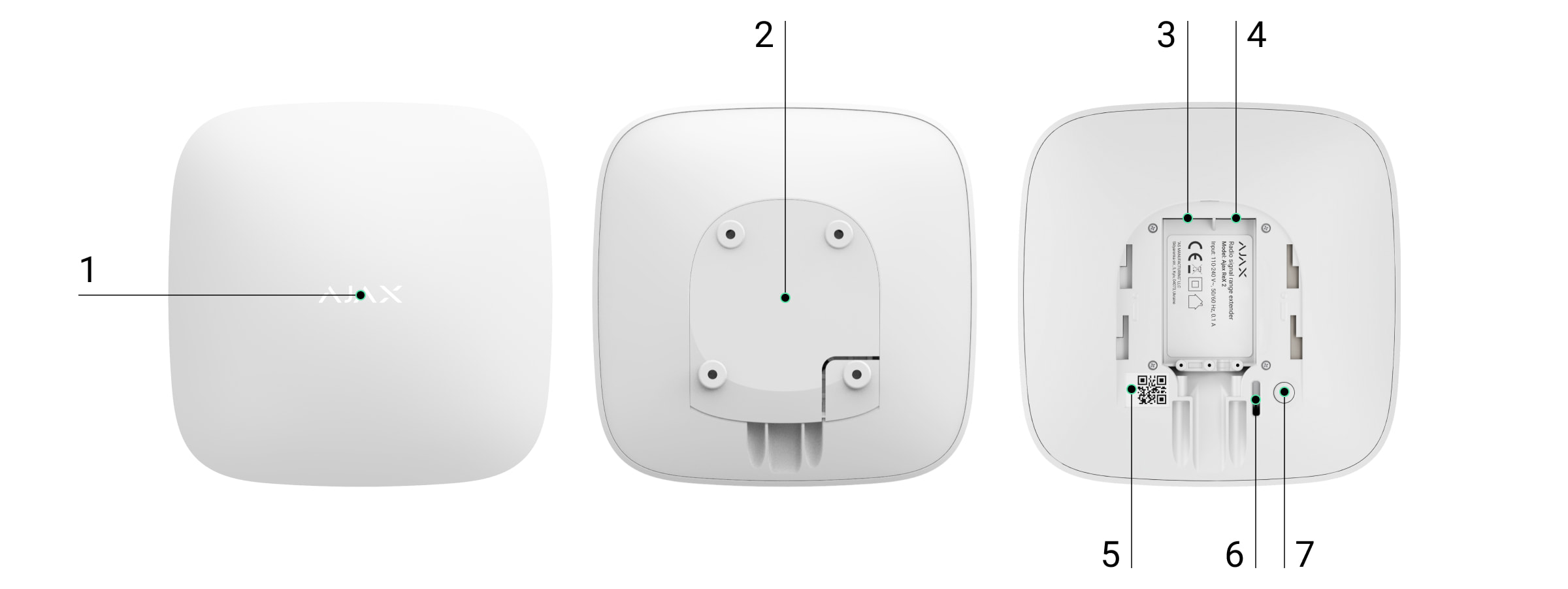
Functional elements
Ajax logo with LED indicator
SmartBracket mounting panel (perforated part for tamper activation)
Power connector
Ethernet port
QR code
Tamper button
Power button
Functional elements
Logo with LED indicator
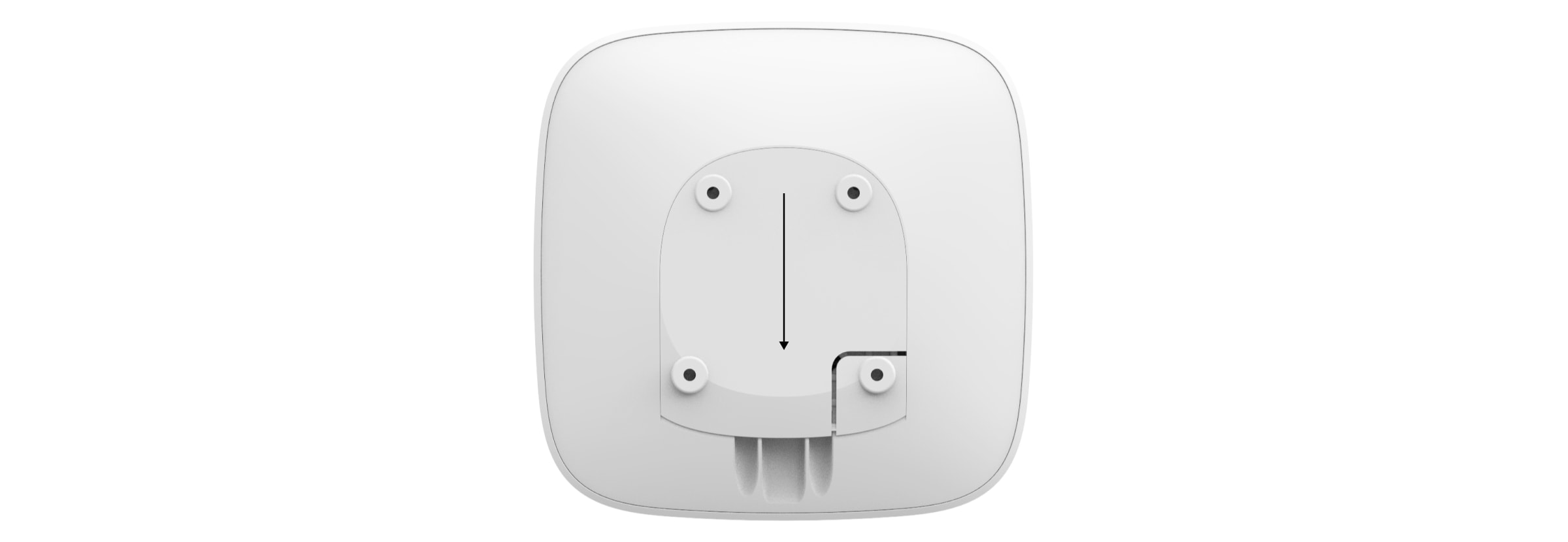
SmartBracket mounting panel (opens by sliding down forcefully)
The perforated part is needed to activate the tamper when trying to remove the amplifier from the surface. Do not remove!
Power cable connector
Ethernet cable connector
QR code with amplifier identifier (service number)
Tamper button
Power button
Operating principle
The ReX 2 Jeweller extends the radio range of the security system and provides photo verification transmission. It receives signals from the hub and sends them to the connected devices, and forwards the devices' signals back to the hub.
Principle of operation
The ReX 2 Jeweller extends the radio range of the security system by allowing Ajax devices to be installed at a greater distance from the hub.
ReX 2 Jeweller can communicate with the hub via radio (Jeweller and Wings protocols) or Ethernet cable if the devices are on the same network.
The amplifier receives signals from the hub, forwards them to the connected devices and sends the devices' signals back to the hub.
The hub polls the ReX 2 Jeweller every 12 to 300 seconds (by settings, default value is 36 seconds).
The ReX 2 Jeweller polls all connected devices with the same frequency.
Regardless of the settings, all alarms are transmitted within 0.3 seconds.
The communication range between the ReX 2 Jeweller and the device is limited by the radio signal range of the device itself. The radio signal range is indicated on the device page on the website and in the User Manual.
If the device loses connection to a signal amplifier for any reason, it will not automatically connect to another amplifier or hub.
Jeweller and Wings communication protocols
The signal booster uses Jeweller technology for alarm and event transmission and Wings technology for photo transmission. These are bi-directional wireless data transfer technologies that provide fast and reliable communication between the hub, the signal booster and the connected system devices.
The protocols support block encryption with dynamic keying and device identification in each communication session to protect against sabotage and tampering.
The Ajax application shall provide a 'hub-to-device' polling system at intervals of 12 to 300 seconds to monitor communications with system devices and display their status. The polling interval can be adjusted by the user or by a PRO with administrator rights.
Learn more Connection via Ethernet
ReX 2 Jeweller with OS Malevich 2.13 firmware supports connection to the hub via radio and Ethernet. Using a cable connection, a single Ajax system can cover sites such as an office centre with underground parking, a metal hangar or a warehouse complex of several large buildings. Ethernet can be the only communication channel or run in parallel with Jeweller and Wings. If ReX 2 Jeweller is connected to the hub via both Ethernet and radio channels, Ethernet is preferred.
The Hub and the ReX 2 Jeweller must be connected to the same network via a router for this communication channel to work. The router is needed to determine the IP address of the signal booster. The network to which the ReX 2 Jeweller connects shall support broadcast requests and provide an open port 4269 for all data transmissions.
A direct connection to the hub via Ethernet cable is not foreseen.
The ReX 2 Jeweller can operate with both static and dynamic IP addresses. If the signal booster fails to establish an Ethernet connection to the hub, an error will be displayed in the ReX 2 Jeweller status. For convenience, the MAC address of the signal booster is also available in the error information to help find and fix the problem.
A connection loss notification is sent in two cases: if the hub loses connection to the signal booster completely or if the connection to the booster is lost over the photo transmission channel. If the connection is lost only via Jeweller or only via Wings (if Ethernet is connected), no notification is sent.
Photo verification support
The ReX 2 Jeweller radio signal booster supports the addition of detectors with photo verification. ReX 2 Jeweller can not only transmit events and alarms, but also photos taken by the detector.
The photo delivery time through the amplifier depends on the communication channel with the hub, the type of detector and the resolution of the image.
Photo delivery time via Wings radio protocol:
Detector
Photo resolution, px
Delivery time through amplifier¹, s
Superior MotionCam AM (PhOD) Jeweller, Superior MotionCam HD (PhOD) Jeweller
160 × 120
up to 11
320 × 240
up to 18
640 × 480 (default)
up to 39
960 × 720
up to 53
MotionCam (PhOD) Jeweller, Superior MotionCam (PhOD) Jeweller, MotionCam Jeweller
160 × 120
up to 8
320 × 240 (default)
up to 18
640 × 480
up to 31
MotionCam Outdoor Jeweller
320 × 176 (default)
up to 13
640 × 352
up to 30
MotionCam Outdoor (PhOD) Jeweller
320 × 176 (default)
up to 37
640 × 352
up to 50
MotionCam Outdoor HighMount (PhOD) Jeweller
320 × 176 (default)
up to 20
640 × 352
up to 38
¹ Values are calculated assuming the hub is running over Ethernet or 4G and the signal level between the ReX 2 Jeweller and the detector and between the hub and the ReX 2 Jeweller is three bars. When using the "Photo on Demand" function, there may be a slight delay (up to 3 seconds) before the detector takes a photo.
Photo delivery time via Ethernet:
Detector
Photo resolution, px
Delivery time via amplifier², s
Superior MotionCam AM (PhOD) Jeweller, Superior MotionCam HD (PhOD) Jeweller
160 × 120
up to 4
320 × 240
up to 5.5
640 × 480 (default)
up to 13
960 × 720
up to 17,5
MotionCam (PhOD) Jeweller, Superior MotionCam (PhOD) Jeweller
160 × 120
up to 6
320 × 240 (default)
up to 10
640 × 480
up to 16
MotionCam Jeweller
160 × 120
up to 6
320 × 240 (default)
up to 10
640 × 480
up to 17
MotionCam Outdoor Jeweller
320 × 176 (default)
up to 10
640 × 352
up to 21
MotionCam Outdoor (PhOD) Jeweller
320 × 176 (default)
up to 24
640 × 352
up to 32
MotionCam Outdoor HighMount (PhOD) Jeweller
320 × 176 (default)
up to 11
640 × 352
up to 18
² Values are calculated assuming the hub is running over Ethernet or 4G and the signal level between the ReX 2 Jeweller and the detector is three bars. When using the "Photo on Demand" function, there may be a slight delay (up to 3 seconds) before the detector takes a photo.
Photo verification features in Ajax
Number of connected signal amplifiers and devices
Depending on the model, the following number of signal amplifiers can be connected to the hub:
Hub model
ReX 2 Number of Jeweller
Hub 2 (2G)
5
Hub 2 (4G)
5
Hub 2 Plus
5
Superior Hub Hybrid (2G)
5
Superior Hub Hybrid (4G)
5
It does not matter which type of amplifier is used: ReX Jeweller or ReX 2 Jeweller. They can be connected in any combination, subject to hub restrictions.
ReX 2 Jeweller connects to the hub directly only. Connection to another amplifier is not foreseen.
ReX 2 Jeweller does not increase the number of devices connected to the hub. The maximum number of devices depends on the hub model:
Hub model
Number of devices connected
Hub 2 (2G)
99
Hub 2 (4G)
99
Hub 2 Plus
199
Superior Hub Hybrid (2G)
99
Superior Hub Hybrid (4G)
99
Sending events to a monitoring station
The Ajax system can be connected to the CMS and transmit alarms and events in SurGard (Contact ID), SIA (DC-09), ADEMCO 685 and other proprietary protocols. A full list of supported protocols is available at the following link.
Ajax connection to monitoring software
The ReX 2 Jeweller loop (zone) number is available in the device status. To obtain it:
Log in to the Ajax app.
Select a zone if there are several.
Open the "Devices" menu.
Select ReX 2 Jeweller. The loop (zone) number is displayed at the very bottom of the page.
The ReX 2 Jeweller loop (zone) number is also available in the "Groups" menu (Ajax app → Devices → Hub → Settings → Groups). The device number corresponds to the loop (zone) number.
Compatible hub models
A hub is required for ReX 2 Jeweller operation.
Connection
The signal booster only works with compatible Ajax hubs. Connection to other hubs, signal boosters, uartBridge and ocBridge Plus is not provided.
Hub and device operating on different radio frequencies are not compatible. The radio frequency range of the device may vary depending on the region. We recommend that you purchase and use Ajax devices in the same region. For frequency ranges, please contact technical support.
Before connecting the device:
Install the Ajax or Ajax PRO app.
Sign in to your account or create a new one.
Select a room or create a new one.
Add at least one virtual space.
Add a compatible hub to the room. Make sure it is switched on and has access to the internet via Ethernet, Wi-Fi and/or a mobile network.
Make sure the room is disarmed and the hub is not updating by checking the status in the Ajax app.
To connect the ReX 2 Jeweller to the hub:
Remove the SmartBracket mounting panel by sliding it down forcefully. Do not touch the perforated part as it is needed to operate the sabotage sensor that protects the signal amplifier from disassembly.
Click Add; the countdown will start. Switch on the ReX 2 Jeweller by holding the power button down for 3 seconds.
To ensure that the ReX 2 Jeweller is connected to the hub, the signal booster must be located in the same protected area as the system (within range of the hub radio network).
Once connected to the hub, the colour of the logo will change from red to white within 30 seconds. The connected signal booster will appear in the list of hub devices in the Ajax app. The frequency of the status update depends on the Jeweller settings (or Jeweller/Fibre for hybrid Ajax hubs); the default value is 36 seconds.
If the connection fails, turn off the ReX 2 Jeweller and try again after 5 seconds. If the maximum number of devices connected to the hub (depending on the hub model) has already been reached when you try to connect a device, you will receive a corresponding message in the Ajax app.
ReX 2 Jeweller only works with one hub. When connecting to a new hub, the signal booster stops sending commands to the old one. After connecting to a new hub, ReX 2 Jeweller is not automatically removed from the device list of the old hub. This needs to be done in the Ajax app.
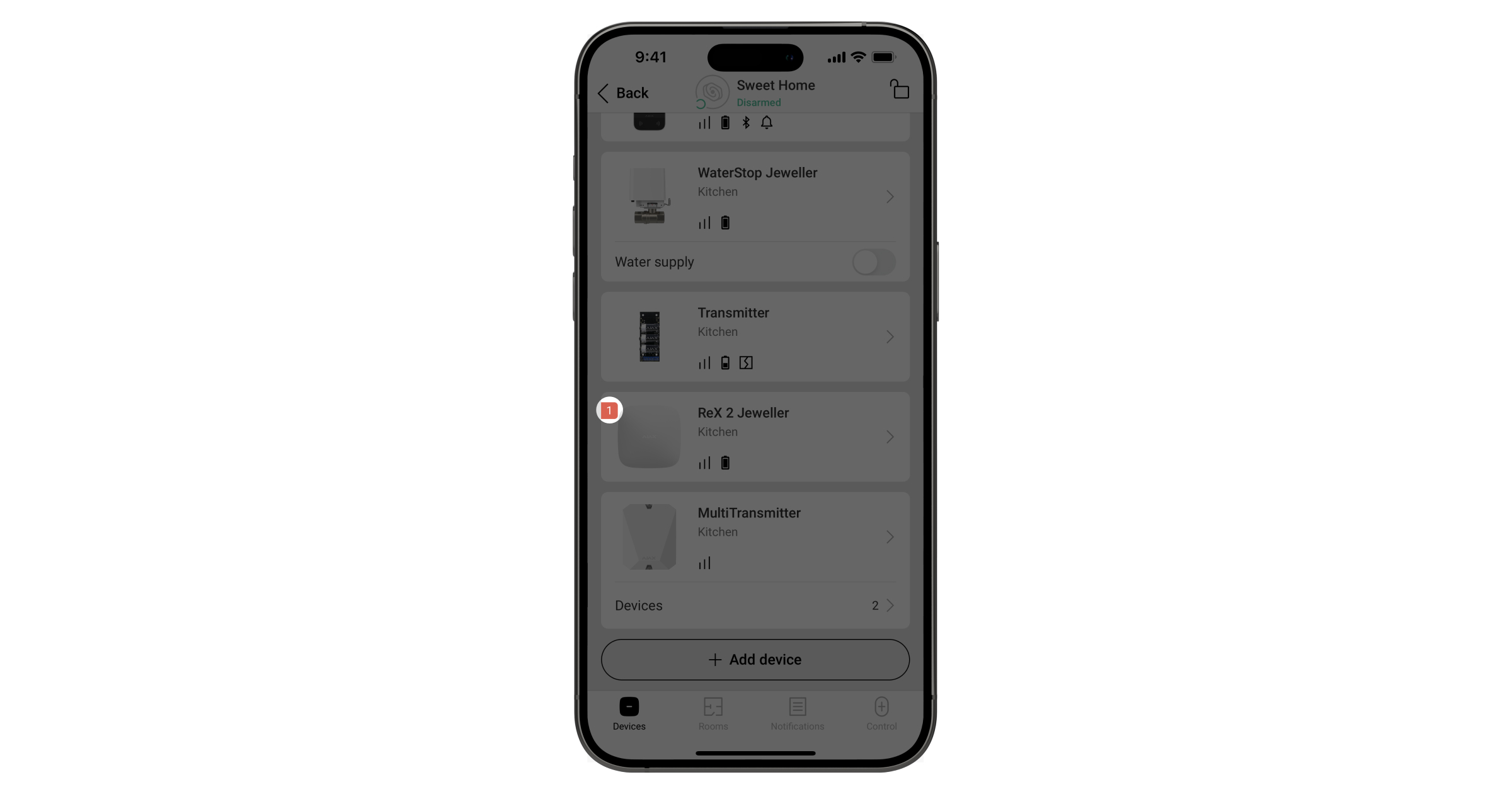
Error icon
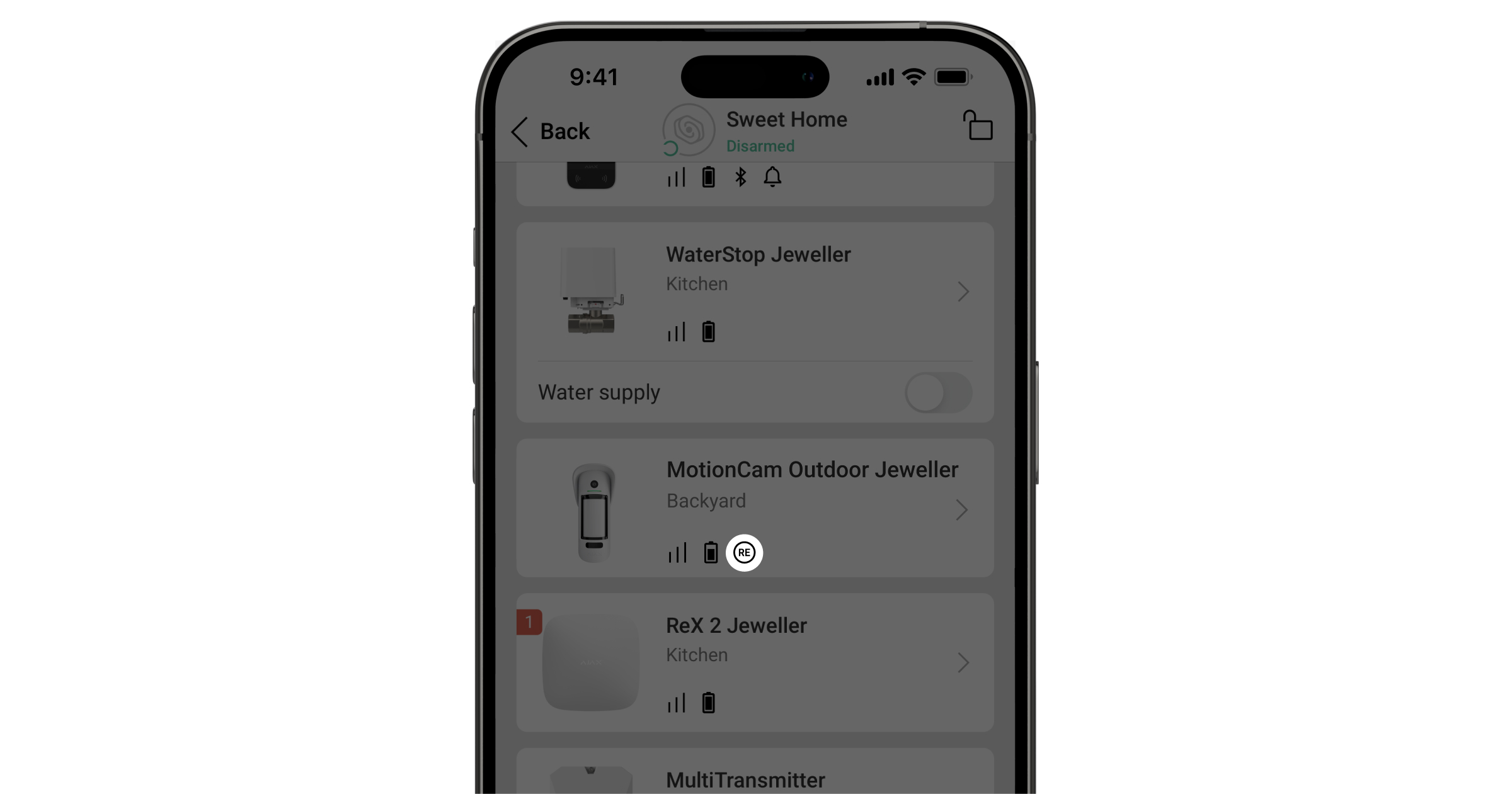
When the signal booster detects a failure (e.g. no external power supply), the Ajax app displays an emblem with a counter in the upper left corner of the device icon.
All failures are displayed in the statuses of the signal amplifier. Fields with errors will be highlighted in red.
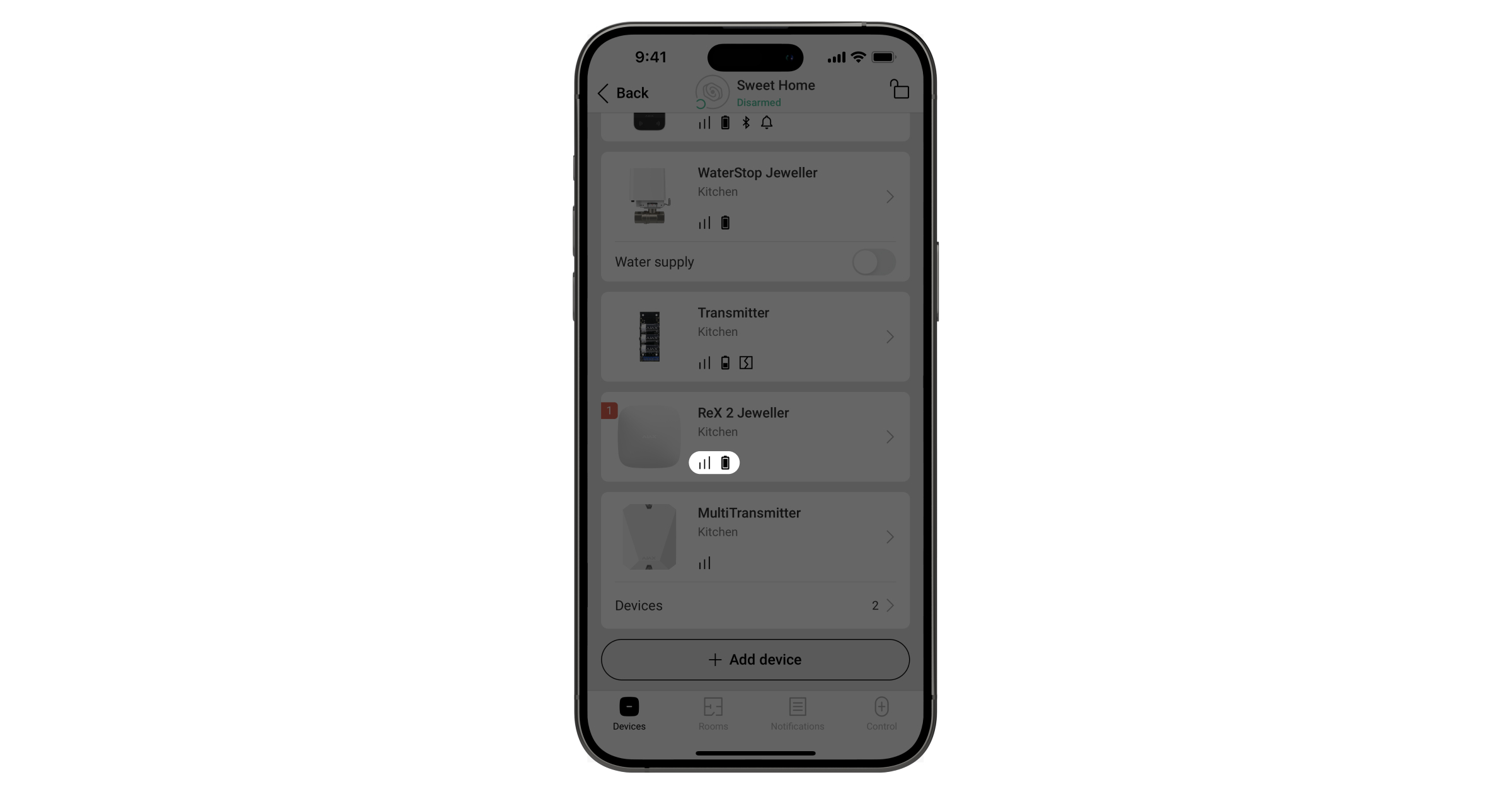
Icons
The icons represent some of the ReX 2 Jeweller statuses. These can be viewed in the Devices tab of the Ajax app.
Icon - Meaning
Jeweller signal strength. Displays the signal strength between the hub and the signal amplifier. The recommended value is 2-3 bars. Learn more
Battery charge level. Learn more
Fault detected. A list of faults and their description is available in the signal amplifier statuses.
The device is in signal suppression test mode. Learn more
ReX 2 Jeweller is deactivated. Learn more
ReX 2 Jeweller has been deactivated for sabotage sensor trigger notifications. Learn more
The device has lost connection to the hub or the hub has lost connection to the Ajax Cloud server.
The device has not been transferred to the new hub. Learn more
Status
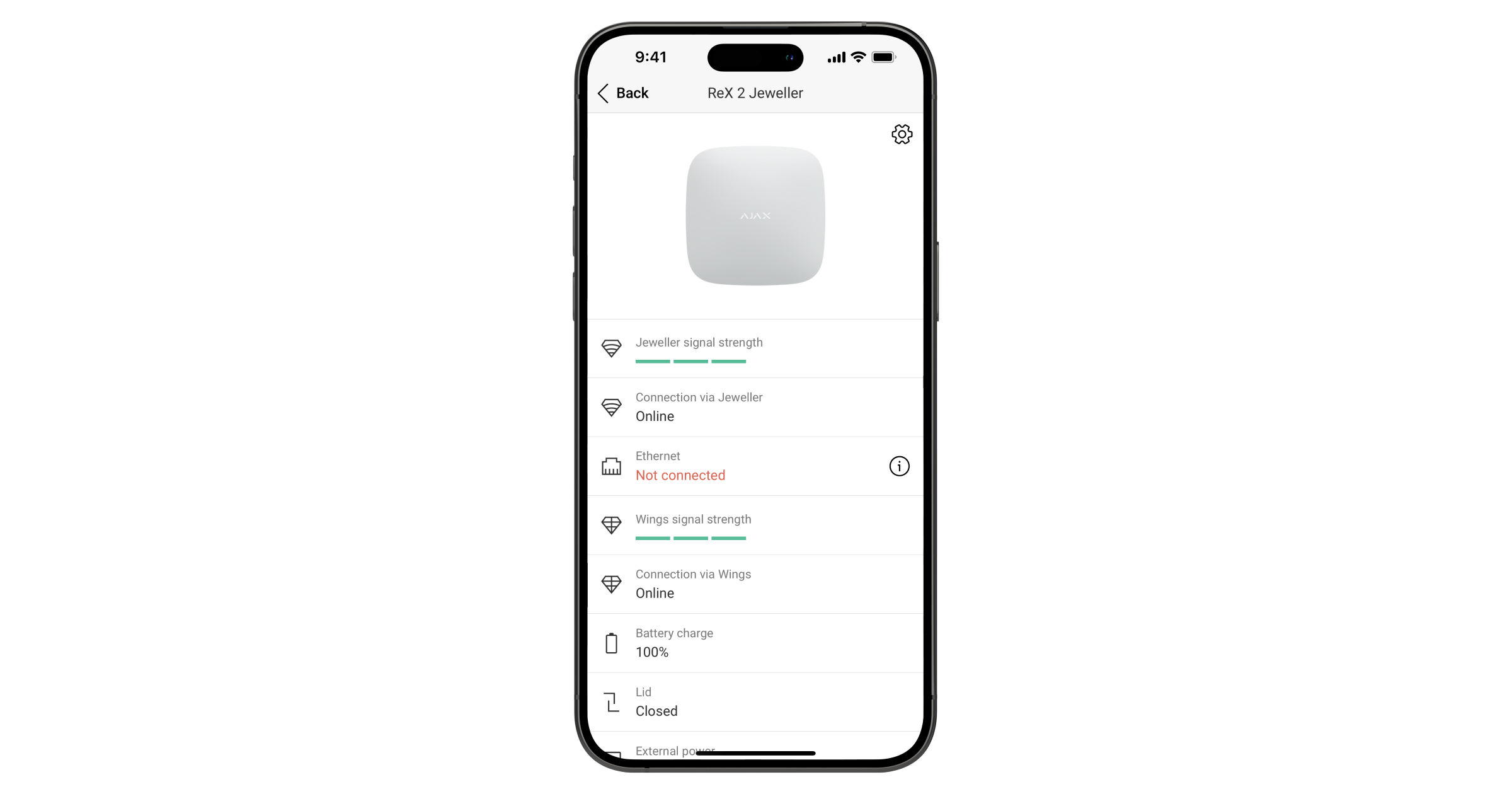
Statuses contain information about the device and its operating parameters. ReX 2 Jeweller statuses can be viewed in the Ajax app:
Select a room if there are several.
Open the Devices tab.
Select ReX 2 Jeweller from the list.
Parameter - Meaning
Data import Indicates an error when data is transferred to the new hub:
Failed - device has not been transferred to the new hub. Learn more
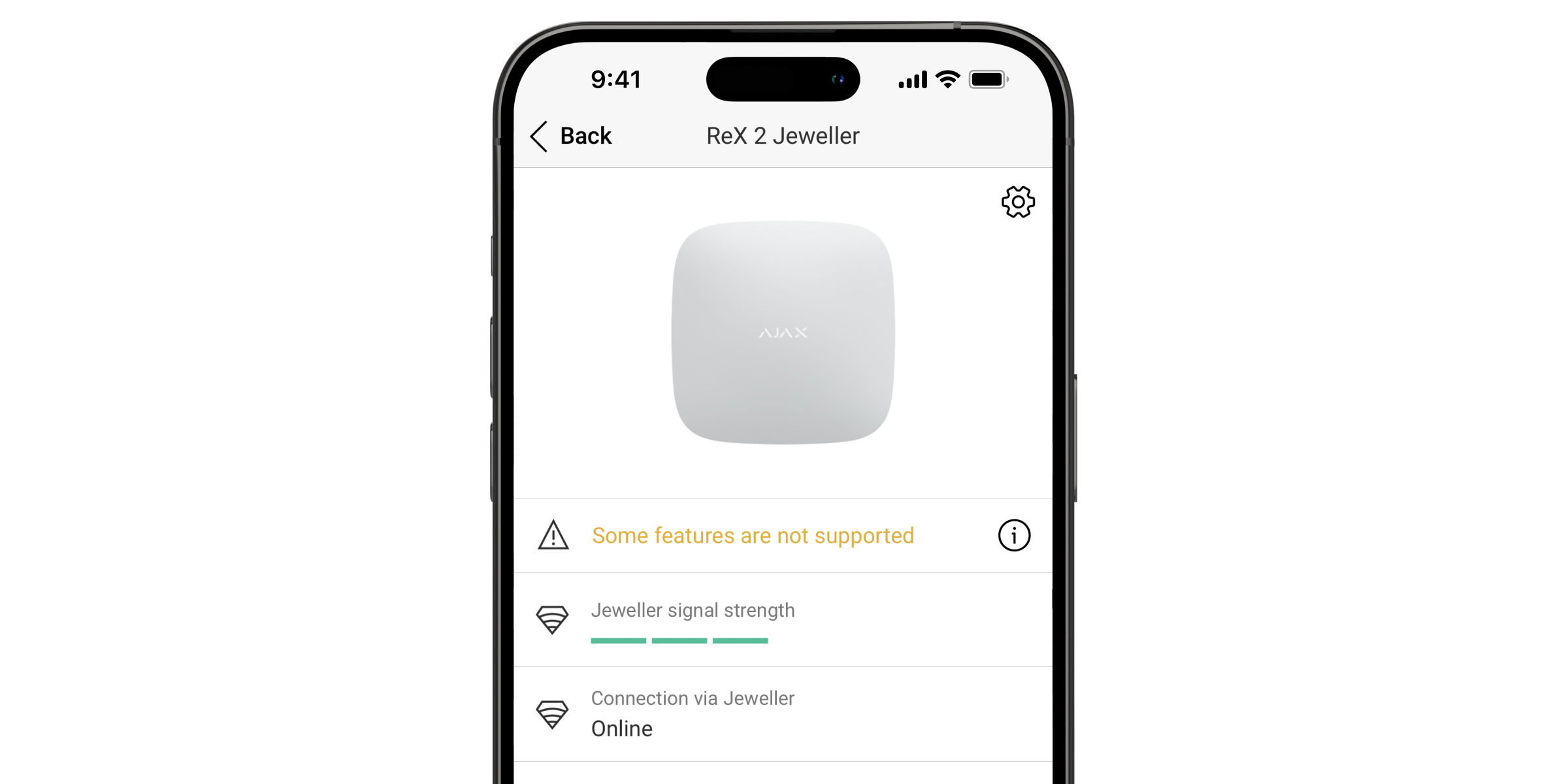
Some functions do not work The field is displayed if the versions of the hub and ReX 2 Jeweller firmware do not match.
ReX 2 Jeweller is updated within half an hour if the system is disarmed. Firmware update requires stable:
External power supply for hub and signal amplifier,
a connection between the hub and ReX 2 Jeweller,
connection of the hub to the Internet.
How to update the OS Malevich
Jeweller signal strength Jeweller signal strength between hub and ReX 2 Jeweller. Recommended value is 2-3 columns. Jeweller is a protocol for transferring alarms and events. Learn more
Connection via Jeweller Connection status between hub and ReX 2 Jeweller via Jeweller:
Online - Signal booster is connected.
Offline - no connection to the signal booster.
Ethernet Connection status between hub and ReX 2 Jeweller via Ethernet:
Connected - the signal amplifier is connected.
Not connected - no connection to the signal amplifier.
Disabled - Ethernet connection is disabled in the signal amplifier settings.
When the button is pressed, the connection information is displayed: IP address, subnet mask, gateway and MAC address of the signal amplifier.
Wings signal strength Wings signal strength between hub and ReX 2 Jeweller. Recommended value is 2-3 bars. Wings is a protocol for transferring photos taken by detectors with photo verification. Learn more
Connection via Wings Connection status between hub and ReX 2 Jeweller via Wings:
Online - ReX 2 Jeweller can transfer photos to the hub.
Offline - ReX 2 Jeweller cannot transfer the photo to the hub.
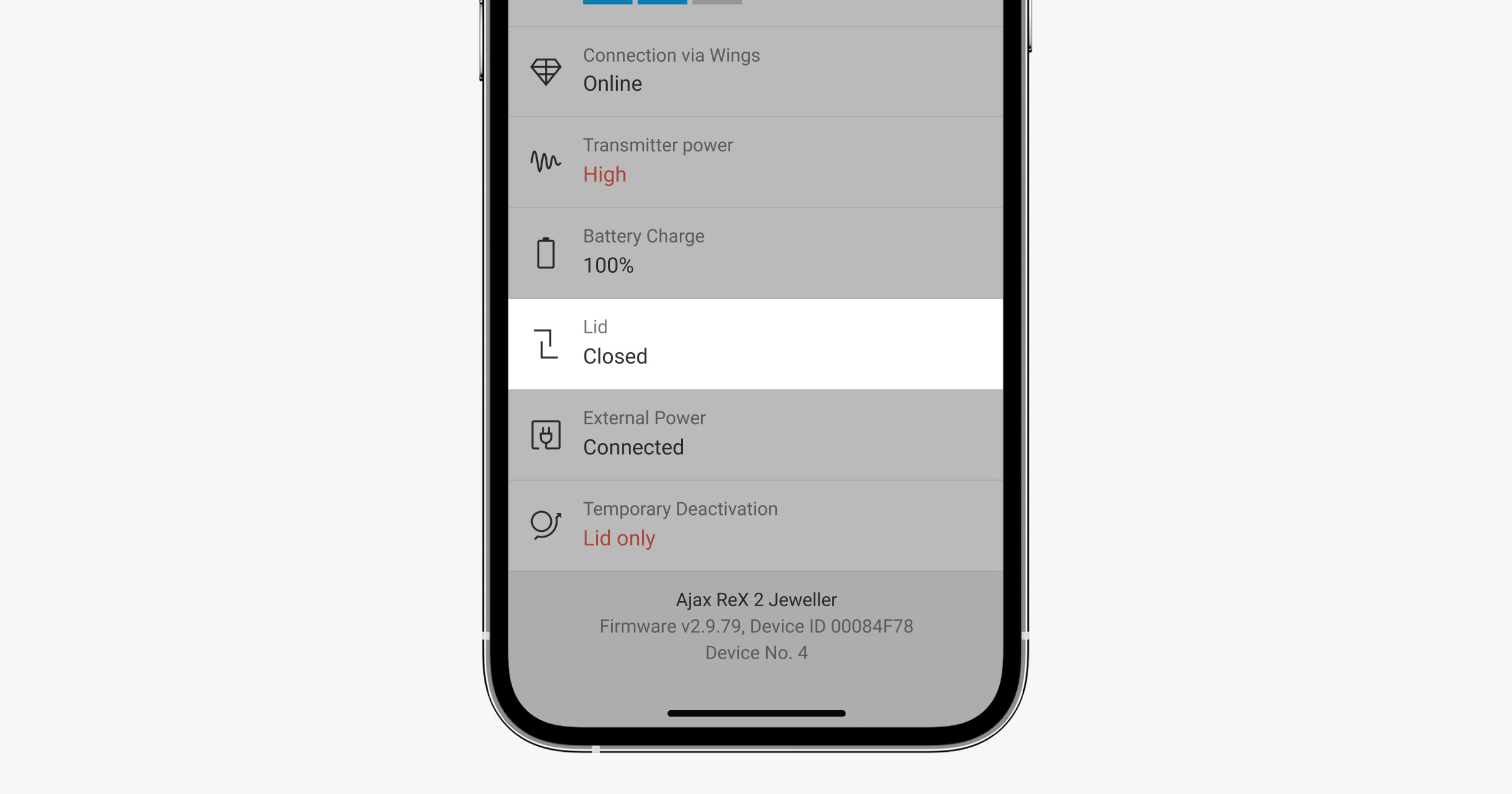
Transmitter power Displays the selected transmitter power. This parameter appears when Max or Damping is selected in the Signal Damping Test menu. Learn more
Battery Charge ReX 2 Jeweller backup battery charge level. Displayed in 5% increments. Learn more
Enclosure Status of the Signal Amplifier Sabotage Sensor, which responds to enclosure removal or damage:
Open - Signal Amplifier Mounting Panel removed or housing integrity compromised.
Closed - amplifier mounted on mounting panel. Learn more
External power supply Status of external power supply (110-240 V):
Connected - External power supply is connected.
Disconnected - the external power supply is disconnected.
Permanent deactivation Displays the status of the permanent deactivation function of the device:
No - the device operates normally and transmits all events.
Enclosure only - the hub administrator has disabled notifications for triggering the tamper sensor.
Completely - the device has been completely deactivated from system operation by the Hub Administrator.
If the signal booster is fully disabled, connected devices continue to operate normally via ReX 2 Jeweller. Learn more
One-time deactivation Shows the status of the one-time deactivation settings of the device:
No - the device operates normally.
Hull only - Sabotage sensor notifications are disabled until first disarm.
Completely - the device is completely disabled from system operation until the first disarm. The device does not execute system commands and does not report alarms or other events.
If the signal amplifier is fully deactivated, connected devices continue to operate normally through the ReX 2 Jeweller. Learn more
Firmware ReX 2 Jeweller firmware version. Updates remotely as soon as an update becomes available on the Ajax Cloud server. Learn more
Device ID ReX 2 Jeweller ID/serial number. Also indicated on the device box, circuit board and case (under the SmartBracket mount).
Device No. Device loop (zone) number.
Settings
ReX 2 Jeweller settings can be changed in the Ajax app:
Select a room if there are several.
Open the Devices tab.
Select ReX 2 Jeweller from the list.
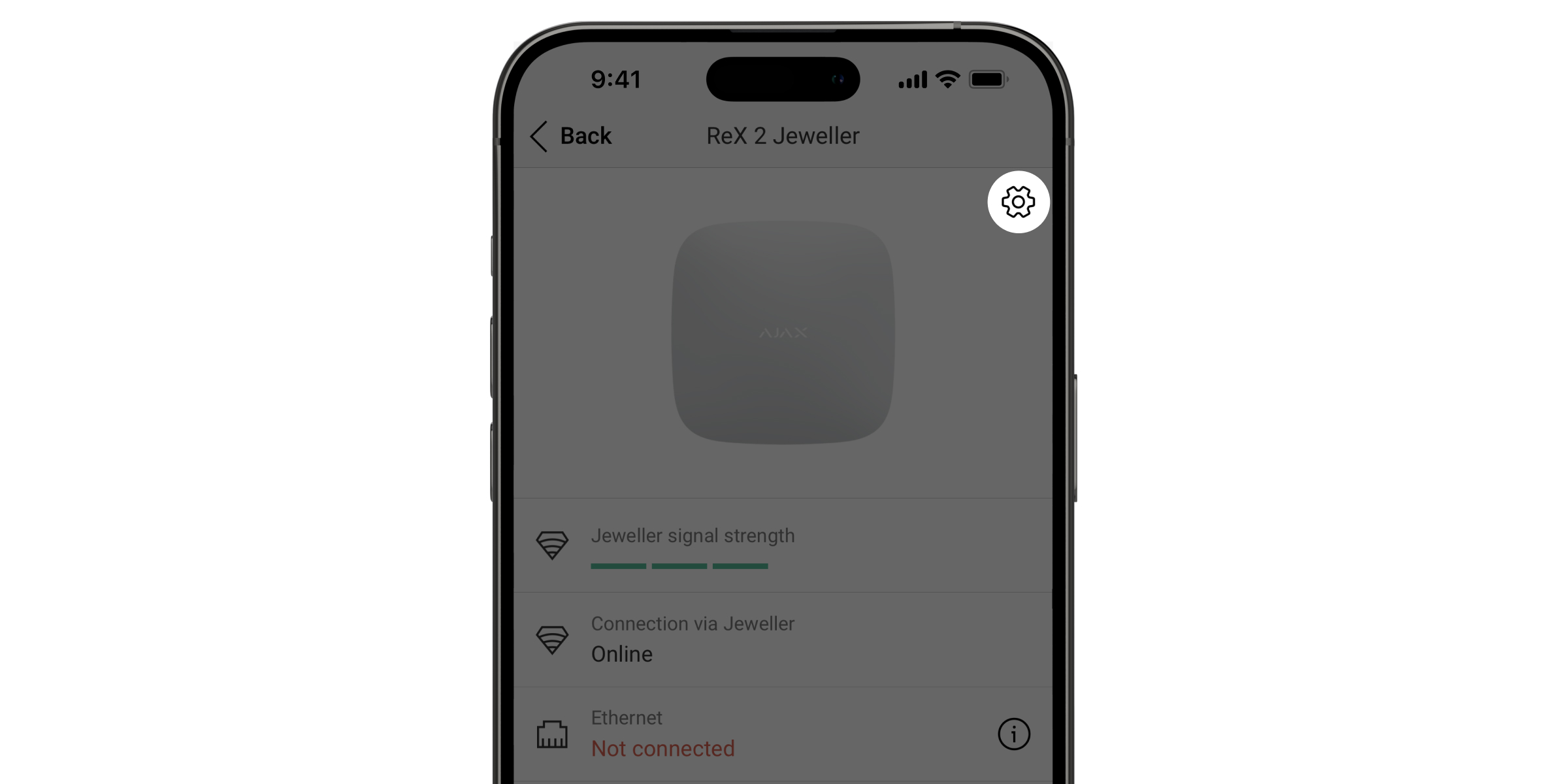
Go to Settings by clicking on the gear icon in the top right corner.
Set the required parameters.
Click Back to save the new settings.
Setting - Meaning
Name ReX 2 Jeweller Name. Appears in SMS text and notifications in the event feed. To change the name, click the pencil icon. The name can contain up to 12 Cyrillic characters or up to 24 Latin characters.
Room Select the virtual room to which ReX 2 Jeweller is connected. The room name is displayed in SMS text and notifications in the event stream.
Ethernet settings Menu for connecting to the hub via Ethernet:
Connection via Ethernet - enables or disables the connection via Ethernet.
Connection type - allows you to customize the connection type: DHCP or static IP address.
MAC address - shows and allows copying the MAC address of the signal booster.
Charging mode Available only in Ajax PRO apps. Available for ReX 2 Jeweller running on hubs with OS Malevich 2.24 or later. Sets the charging rate of the built-in battery from an external source.
Two options are available:
Continuous - the battery charges continuously until fully charged. Compatible with most external power supplies.
Intermittent - the battery charges intermittently. Recommended for zinc-air power supplies.
Mark Jeweller/Wings connection loss with failure icons Available for ReX 2 Jeweller with OS Malevich 2.18 or later. Activates a failure icon in the device list when the signal booster loses connection over radio channels. This setting is available only when Ethernet connection is enabled. Deactivating this setting does not turn off connection loss notifications and does not fail the system integrity check.
LED brightness Setting the brightness of the Ajax logo illumination on the signal amplifier. Adjustable from 0 to 10 in increments of 1. Default value is 10.
Paired with a device Menu for selecting devices that work through the signal amplifier. Learn more
Jeweller Signal Strength Test Switches the ReX 2 Jeweller into Jeweller Signal Strength Test mode. The test checks the signal strength between the hub and the ReX 2 Jeweller over the alarm and event transmission channel and helps determine the optimum installation location. Learn more
Wings Signal Strength Test Switches the ReX 2 Jeweller into Wings Signal Strength Test mode. The test checks the signal strength between the hub and the ReX 2 Jeweller over the photo channel and helps determine the optimal installation location. Learn more
Signal attenuation test Switches the device into signal attenuation test mode. The test reduces or increases the power of the radio transmitter to simulate environmental changes and to test the stability of the connection between the signal amplifier and the hub. Learn more
User Guide Open the ReX 2 Jeweller User Guide in the Ajax app.
Permanent deactivation Allows the hub administrator to deactivate the device without disconnecting it from the system.
Three options are available:
No - the device operates normally and forwards all events.
Full - the device does not execute system commands and does not participate in automation scenarios, and the system ignores alarms and other notifications.
Enclosure only - only notifications of the triggering of a tamper sensor are ignored by the system.
Learn more The system will only ignore a deactivated device. Devices connected via ReX 2 Jeweller will continue to operate normally.
One-time deactivation Allows the user to deactivate device events until the first disarm.
Three options are available:
No - the device operates normally.
Completely - the device is completely deactivated from system operation until the first disarm. The device does not execute system commands and does not report alarms or other events.
Hull only - Sabotage sensor notifications are deactivated until first disarm.
Learn more The system will ignore only the deactivated device. Devices connected via ReX 2 Jeweller will continue to operate normally.
Delete device Disconnects ReX 2 Jeweller from the hub and deletes its settings. If detectors are connected to ReX 2 Jeweller, they will try to reconnect to the hub after disconnection.
Connecting devices to the ReX 2 Jeweller
To assign a device to a signal booster, in the Ajax app:
Select a room, if there are several.
Open the Devices tab.
Select ReX 2 Jeweller from the list.
Go to Settings by clicking on the gear icon in the top right corner.
Select the Pair with device menu.
Select the devices that are to work through the signal booster.
Click Back to save your settings.
After pairing the selected devices, the icon appears in the Ajax app. A device can only be connected to one ReX 2 Jeweller. When a device is assigned to one signal amplifier, it is automatically disconnected from the other connected amplifier.
To assign a device to a hub, in the Ajax app:
Select a room, if there are several.
Open the Devices tab.
Select ReX 2 Jeweller from the list.
Go to Settings by clicking on the gear icon in the top right corner.
Select the Pair with device menu.
Uncheck the devices to be added back to the hub.
Click Back to save the settings.
Errors
ReX 2 Jeweller may report detected failures. The Errors field is available in the Device Status section. Clicking , opens a list of all faults. The field is only displayed if a failure has been detected.
Fault - Description - Solution
Some functions do not work. The field is displayed if the huba and ReX 2 Jeweller firmware versions do not match. Solution: make sure that automatic updates are enabled in the huba settings. ReX 2 Jeweller is updated within half an hour if the system is disarmed and a new firmware version is available on the server.
Indication
The ReX 2 Jeweller LED indicator may be white, red or green depending on the status of the device and the Ethernet connection.
Indication when Ethernet connection is disabled
Indication
Event
Note
White.
Connected to the hub via at least one of Jeweller and/or Wings.
If the external power supply is switched off, the indicator flashes every 10 seconds.
On red.
No connection to the hub.
If the external power supply is switched off, the indicator flashes every 10 seconds.
On for 3 minutes, then flashing every 10 seconds.
The external power supply is disconnected.
The colour of the indication depends on the presence of a connection to the hub.
Indication when Ethernet connection is activated
Indication
Event
Note
White.
Connection established to hub via two channels: Jeweller and/or Wings, Ethernet.
If the external power supply is switched off, the indicator flashes every 10 seconds.
Green.
Connected to the hub via at least one of two channels: Jeweller and/or Wings, Ethernet.
If the external power supply is switched off, the indicator flashes every 10 seconds.
On red.
No connection to the hub.
If the external power supply is switched off, the indicator flashes every 10 seconds.
On for 3 minutes, then flashing every 10 seconds.
The external power supply is disconnected.
The colour of the indication depends on the presence of a connection to the hub.
Functionality testing
Functionality tests of the ReX 2 Jeweller do not start immediately, but at the latest within one ping between the hub and the detector (36 seconds with the default settings of the hub). The ping period of the devices can be changed in the Jeweller menu of the hub settings.
To run a test in the Ajax app:
Select a room if there are several.
Open the Devices tab.
Select ReX 2 Jeweller.
Go to Settings.
Select one of the available tests:
Jeweller Signal Strength Test
Wings signal strength test
Signal attenuation test
Selecting the installation location
There are 2 main factors to consider when selecting an installation site:
Jeweller signal strength.
Wings signal strength.
The signal strength between the hub and the signal amplifier and between the signal amplifier and all connected devices must be assessed.
Place the ReX 2 in a Jeweller location with stable Jeweller and Wings signal strength (2-3 bars in the Ajax app). When choosing the installation location, take into account the distance between the signal booster and the hub, as well as obstacles between the devices that prevent the radio signal from propagating: walls, ceilings or large objects in the room.
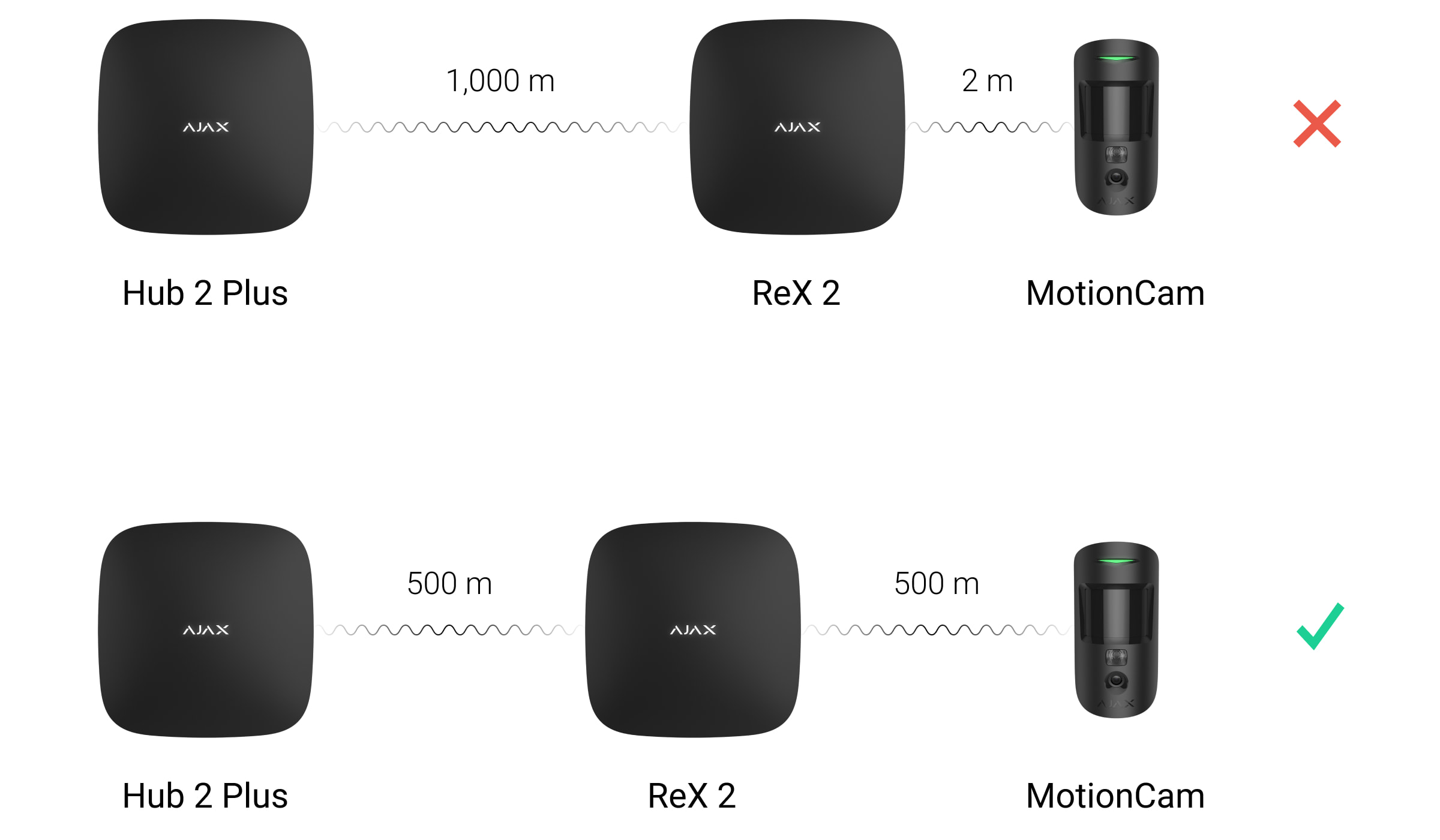
ReX 2 Jeweller should be placed between the hub and a device with a weak signal. The signal booster does not increase the power of radio signals, so placing it next to a hub or device with a signal level of 1 or 0 bars will not give the desired result. Use our radio signal range calculator to estimate the signal level at the installation site.
Check the signal strength of Jeweller and Wings at the installation site. If the signal strength is low (one pole), we cannot guarantee stable operation of the security system. Moving the device even 20 cm can significantly improve signal reception.
If there is no stable signal level (2-3 bars) between the signal booster and the hub at the installation site via Jeweller and Wings, use Ethernet as the main communication channel. This feature allows signal boosters to be installed in basements, metal hangars and other locations where radio signals are not available.
Ethernet can be the only communication channel or run in parallel with radio protocols. Connection via both cable and radio will increase system reliability and operational reliability. In this configuration, the Ethernet channel is preferred.
The ReX 2 Jeweller shall be positioned so that it is not directly visible. This will help reduce the likelihood of sabotage or interference. Remember that the device is intended for indoor use only.
Do not install the ReX 2 Jeweller:
Outdoors. This may cause the device to malfunction or completely stop working.
Close to metal objects or mirrors (e.g. in a metal cabinet). These can obscure and weaken the radio signal.
In rooms where the temperature and humidity exceed the permissible limits. This may cause the device to malfunction or completely stop working.
Close to sources of radio interference: closer than 1 metre from the router and power cables. This may cause loss of connection to the hub or devices connected to the signal amplifier.
In areas with low or unstable signal strength, if Ethernet is not used as the main communication channel. This may cause loss of connectivity to the hub or devices connected to the signal booster.
Installation
Before installing the signal booster, make sure that you have selected the optimum location and that it meets the requirements of this manual.
When installing and operating the device, observe the general rules for electrical safety in the use of electrical appliances and the requirements of the electrical safety regulations.
To install the ReX 2 Jeweller:
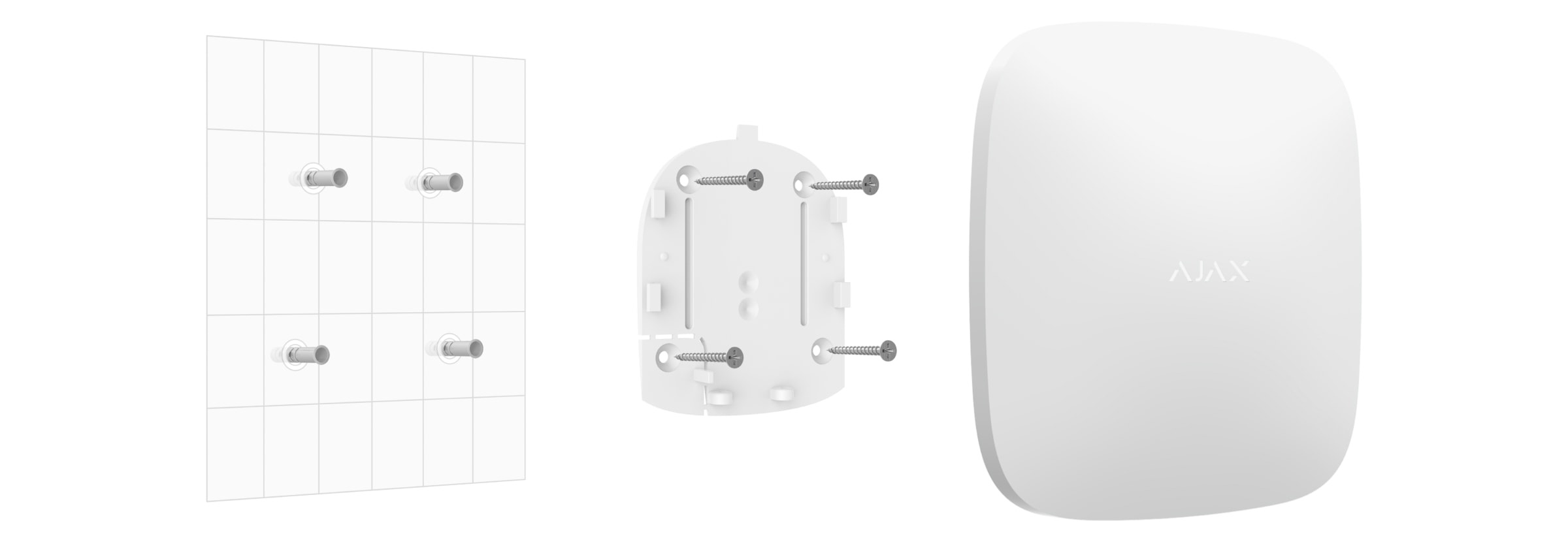
Secure the SmartBracket mounting panel with the screws provided. When using other fasteners, make sure that they do not damage or deform the panel.
Use all fixing points when attaching.
Be sure to secure the SmartBracket's perforated corner so that the sabotage sensor responds to attempts to disconnect the device.
Do not use double-sided adhesive tape for mounting. This can cause the signal amplifier to fall off. The device may be damaged by impact.
Connect the power cable and, if necessary, the Ethernet cable to the signal amplifier. Switch on the device.
Secure the cable with the plastic locking plate. This will reduce the risk of sabotage as it is much more difficult to tear off a fixed cable.
Slide the ReX 2 Jeweller onto the mounting panel. After installation, check the status of the sabotage sensor in the Ajax app and then the quality of the fixing of the panel. You will receive a notification if an attempt is made to pull the signal amplifier off the surface or remove it from the mounting panel.
Secure the ReX 2 Jeweller to the SmartBracket panel with the screws provided.
Do not install the signal amplifier inverted or sideways if it is mounted vertically (e.g. on a wall). When properly mounted, the Ajax logo is readable horizontally.
Maintenance
Check the operation of the ReX 2 Jeweller regularly. The optimum frequency is every three months. Clean the housing of dust, cobwebs and other dirt as it appears. Use a soft, dry cloth designed for the care of machinery.
Do not use substances containing alcohol, acetone, benzine or other active solvents for cleaning.
If the ReX 2 Jeweller battery becomes damaged and you wish to replace it, use the following instructions:
Technical Specifications - ReX 2 Jeweller
Connection
Jeweller, Wings, Ethernet
Maximum range: up to 1700 m (open area)
Ethernet priority if available in parallel with radio channels
Supports DHCP and static IP
Photo verification
Supports detectors with photo verification
Image transmission via Wings and/or Ethernet
Delivery time depends on resolution and channel (e.g. 640×480 px up to 39 s via Wings, up to 17 s via Ethernet)
Compatibility
Works with Hub 2, Hub 2 (2G/4G), Hub 2 Plus, Superior Hub Hybrid (2G/4G)
Up to 5 ReX 2 Jeweller per Hub
Device count: up to 99 or 199 (depending on hub model)
Backup battery: rechargeable, with choice of charging modes (continuous/interval)
LED indication
White: connection active
Green: connection via at least one channel + Ethernet
Red: no connection
Flashes every 10 s: no external power supply
Installation
Indoor only
Optimum signal strength: 2-3 bars
Not to be installed outdoors, near metal objects or sources of interference (<1 m from router/cables)
Maintenance
Functionality check: every 3 months
Cleaning with a dry, soft cloth
Alcohol, acetone, petrol and other solvents are prohibited
Shipping and returns
Supply of goods:
You can choose the most convenient and closest delivery place or point during the order process. It will be possible to conveniently view all the nearest delivery locations on the map or choose delivery to the delivery address you specified.
The formation of the delivery of the goods takes place automatically as soon as we have received the payment for the purchase.
We can fulfill 97% of all orders received immediately and ensure the fastest possible delivery by handing over the prepared package to the courier on the day of receipt of payment.
Next, the package delivery speed already depends on the courier service provider.
We cooperate with: Omniva parcel delivery service, as well as delivery to the specified address by Omniva courier.
1. The product can be received FREE of charge in our store with a card
2. PARCELS. Delivery in all OMNIVA parcels EUR 2.99
3. COURIER. Riga and Riga district, the rest of Latvia EUR 6.00
Returning goods:
We are all about satisfied customers.
There is no need to write a submission to return the goods. If you want to return the product, call us or write on WhatsApp to +371 200 22 881 or write a free e-mail to info@ledakcijas.lv with the order number. We will be grateful if you mention the reason for the return. After receiving the confirmation, you or any other person with whom you will agree must deliver the product to the LEDAKCIJAS.LV store at Cesvaines Street 15a, Riga, or send it via Omniva Parcel to Mego, Sakharova Street 2, Riga Parcel indicating the recipient's number +371 200 22 881 and a description of the problem.
We will return the money within 1 day to a week after receiving the returned item (excluding the delivery fee). The cost of returning the product by post, courier or transport must be borne by the customer, except in cases where the product is defective or does not match the description.
We will examine the problem and agree on the best solution for the situation. The product is not changed or repaired if the damage occurred by not following the instructions for use and regulations.